undefined vs not defined
Two phrases that sound nearly identical. They mean completely different things, and mixing them up is one of the most common JavaScript mistakes.
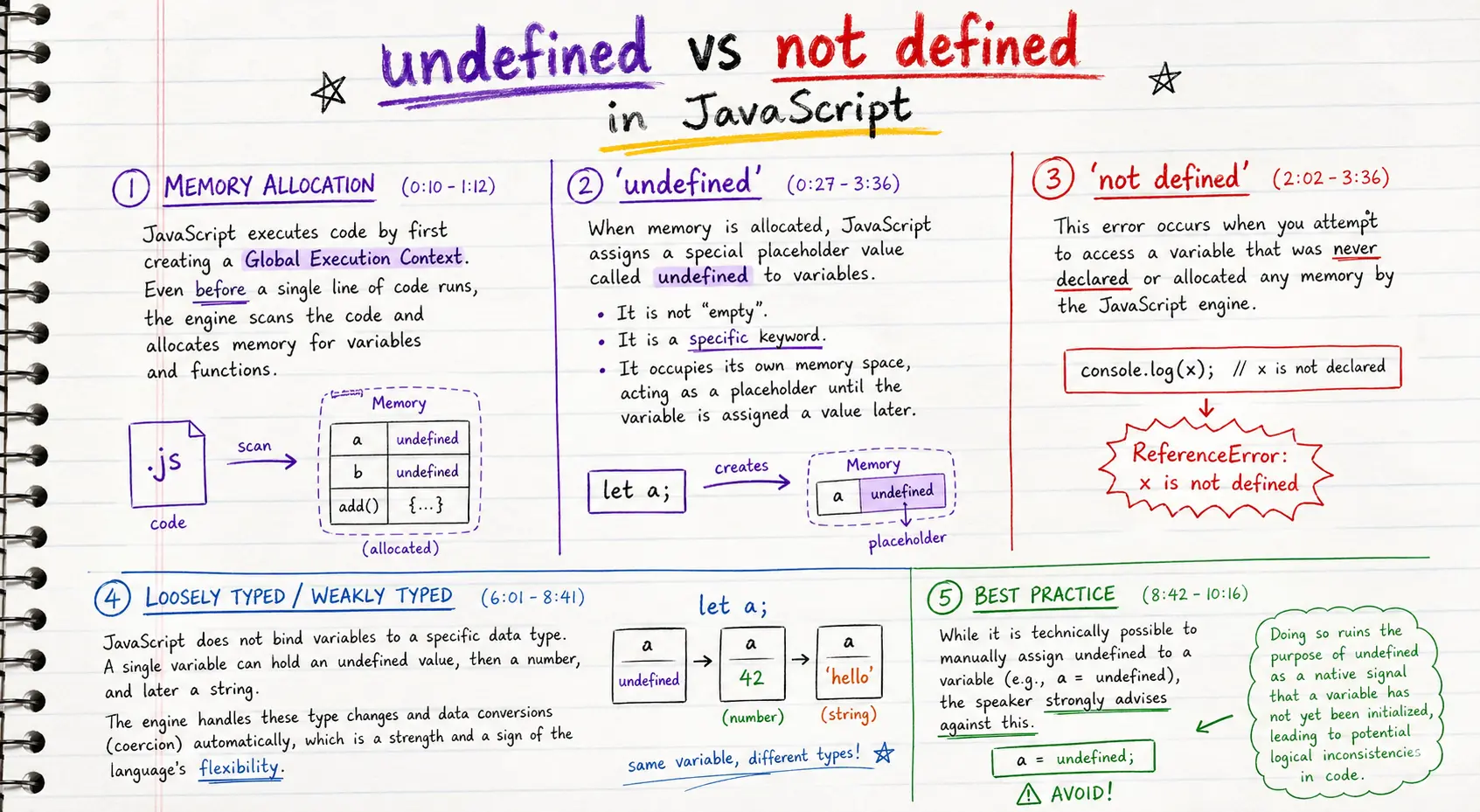
Memory allocation before execution
Before a single line of your code runs, the JavaScript engine performs a memory creation phase. It scans the entire script and allocates a memory slot for every var declaration and function declaration it finds.
// The engine scans this whole file BEFORE executing any line.
// After the scan, memory looks like this:
//   x     → undefined    (var found; no value assigned yet)
//   greet → ƒ greet()    (function declaration; fully loaded)

console.log(x)      // undefined
console.log(greet)  // ƒ greet() { ... }

var x = 10
function greet() {
  console.log("Hello")
}
The engine does not skip to x = 10 and assign 10 right away. It gives x a placeholder first — the special value undefined — and fills in the real value only when the assignment line actually executes.
undefined is a real value, not "empty"
undefined is not the same as "no value", "blank", or null. It is a concrete JavaScript value — a keyword — that the engine uses as a placeholder until you assign something else.
var a
console.log(a)            // undefined
console.log(typeof a)     // "undefined"
console.log(a === undefined) // true
Think of undefined as the engine saying:
✦"I know this variable exists. I reserved a memory slot for it. Nothing has been put there yet."
You can verify that undefined itself has a type and occupies an identity:
console.log(typeof undefined)   // "undefined"
console.log(undefined == null)  // true   (loose equality)
console.log(undefined === null) // false  (strict equality — they are different values)
Here is the full lifecycle of a var binding, step by step:
// --- Memory creation phase ---
// Engine allocates slot:   x → undefined

// --- Code execution phase (line by line) ---
var x                 // declaration already handled; nothing changes at runtime
console.log(x)        // undefined  ← placeholder still in slot
x = 7                 // slot filled with 7
console.log(x)        // 7
not defined: the binding does not exist
A ReferenceError: x is not defined fires when you try to read a name that was never declared anywhere in scope. The engine has no memory slot for it — not even a placeholder.
console.log(z)  // ReferenceError: z is not defined
// No var z, no let z, no const z — the engine has nothing for 'z'.
Side by side:
// Case 1 — declared with var, not yet assigned → undefined (no error)
var x
console.log(x)  // undefined  ✓

// Case 2 — never declared → ReferenceError  ✗
console.log(y)  // Uncaught ReferenceError: y is not defined
The error message itself contains the phrase "is not defined" — that is where the shorthand comes from. It does not mean the variable is undefined.
// Common confusion:
var x
console.log(x)          // undefined   ← x IS defined (declared), value is undefined
console.log(x === undefined)  // true

console.log(typeof z)   // "undefined" ← safe: typeof does not throw for undeclared names
console.log(z)          // ReferenceError ← direct access throws
typeof is the one operator that will not throw a ReferenceError for an undeclared name — it returns "undefined" instead. Useful for feature-detection guards:
// Safe: check whether an API exists before using it
if (typeof fetch !== "undefined") {
  fetch("/api/data")
}
JavaScript is loosely typed
JavaScript does not lock a variable to a data type. The same variable can hold undefined, then a number, then a string, then an object — the engine adapts automatically.
var a
console.log(typeof a)  // "undefined"

a = 10
console.log(typeof a)  // "number"

a = "hello"
console.log(typeof a)  // "string"

a = true
console.log(typeof a)  // "boolean"

a = { name: "JS" }
console.log(typeof a)  // "object"

a = function () {}
console.log(typeof a)  // "function"
This is loosely typed (also called weakly typed or dynamically typed): the variable has no type. Only the value currently inside it has a type.
Contrast with statically typed languages:
// TypeScript / Java
let x: number = 5
x = "hello"  // ← compile error: Type 'string' is not assignable to type 'number'
In JavaScript the equivalent just works:
var x = 5
x = "hello"  // ← perfectly valid
Type coercion is a direct consequence of this flexibility. When operators receive mixed types, the engine converts values automatically:
console.log(1 + "2")   // "12"  — number coerced to string (+ prefers string concatenation)
console.log("5" - 3)   // 2     — string coerced to number (- only works on numbers)
console.log(true + 1)  // 2     — boolean coerced to number (true → 1)
console.log(null + 1)  // 1     — null coerced to 0
console.log(undefined + 1)  // NaN — undefined cannot be coerced to a number
Coercion is not magic — it follows consistent rules. The last line shows undefined producing NaN, which is why accidentally leaving something undefined and doing arithmetic with it tends to quietly corrupt results.
Never manually assign undefined
You can write a = undefined. It is syntactically valid. You should not.
var a = undefined // ← valid, but wrong
The problem: undefined serves a native engine signal — it means "this variable exists but has not been initialized yet." When you manually assign it, you destroy that signal and make the code ambiguous:
var user = { name: "Alice" }

// Later in code:
user = undefined  // Did you mean to clear it? Is this a bug? No way to tell.
Use null when you want to deliberately express "no value here":
var user = { name: "Alice" }
user = null  // ← explicit: intentional absence of a value
Now there is an unambiguous distinction:
| Value | Meaning |
|---|---|
| undefined | Variable declared but never assigned (engine default) |
| null | Variable intentionally set to "no value" by the programmer |
Real-world example:
// Good — let undefined do its job
var config
if (process.env.NODE_ENV === "production") {
  config = loadProductionConfig()
}

if (config === undefined) {
  // Clearly: config was never loaded (condition was false)
  useDefaultConfig()
}
// Bad — manual undefined ruins the signal
var config = undefined  // why?
config = loadConfig()
config = undefined      // resetting? bug? intentional? ambiguous
// Also bad — assigning undefined in a function to "clear" a value
function clearUser(obj) {
  obj.role = undefined  // use null instead
}
The rule: let undefined mean "not yet initialized." Use null for deliberate absence.
Recap
- JS runs a memory creation phase before any code executes: every
vargets a slot set toundefined. undefinedis a real value — a keyword with its own type. It means: "slot exists, nothing assigned yet."ReferenceError: not definedmeans: no slot exists at all — the name was never declared in any scope.typeof undeclaredNamereturns"undefined"without throwing — useful for safe feature checks.- JS is loosely typed: variables hold any type; only the current value has a type. Coercion happens automatically.
- Never manually assign
undefined. Usenullfor intentional absence; letundefinedkeep its native engine meaning.
✦Before: Hoisting — creation-phase bindings, var vs function declarations.
Next: Variable environment — same name in global vs function scope.